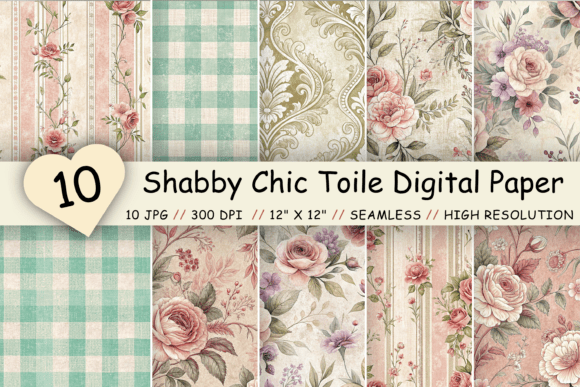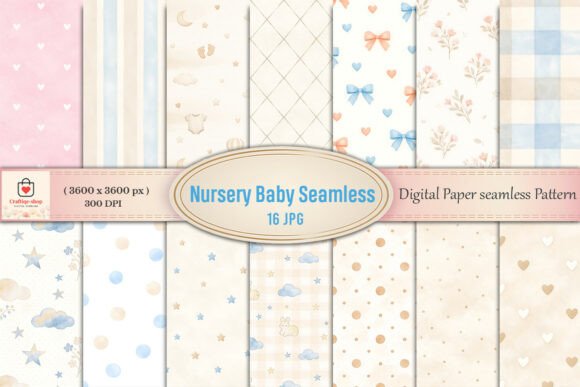
Unlocking Creativity with the Nursery Toile Digital Paper Pack
Digital crafting offers an incredible avenue for expression, allowing you to bring vintage charm and modern precision to your projects instantly. However, the excitement of downloading new assets can sometimes lead to overlooked details that affect the final quality of your work. The Nursery Toile Digital Paper Pack is a prime example of a resource that blends classic aesthetics with high-resolution utility, yet many creators miss out on its full potential simply by not understanding how to evaluate and apply these files correctly.
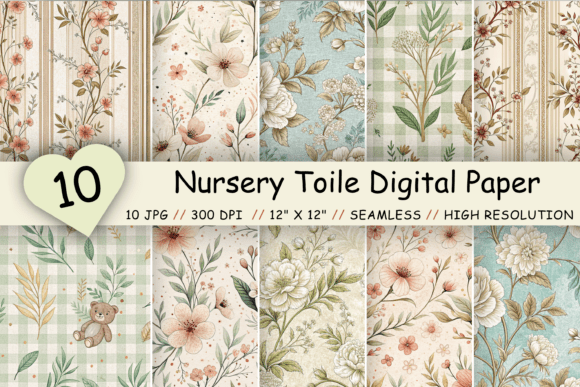
This collection features ten distinct flower digital paper backgrounds, ranging from delicate Vintage Floral Toile designs to crisp Gingham Stripe Seamless Patterns. While the promise of instant creativity is appealing, jumping straight into a project without verifying file specifications or understanding pattern behavior can result in pixelated prints or awkward layout breaks. Whether you are a professional designer creating client invitations, a small business owner packaging handmade goods, or a hobbyist scrapbooking family memories, taking a moment to understand the mechanics of these digital papers will save you time, money, and frustration.
The Trap of Ignoring Resolution Requirements
One of the most common pitfalls in digital crafting is assuming all "high-quality" images are suitable for print. You might download a beautiful floral background, place it in your design software, and only realize upon printing that the image looks blurry or blocky. This happens when the resolution does not match the output size. The Nursery Toile Digital Paper Pack addresses this by providing files at 300 dpi (dots per inch), which is the industry standard for sharp, professional printing.
Many beginners mistakenly believe that an image looking clear on their computer screen will automatically print clearly. Screens typically display at 72 dpi, meaning a low-resolution image can look perfectly fine on a monitor but fails miserably on paper. If you attempt to stretch a lower-quality file to fit a 12 x 12 inch scrapbook page, the pixels expand, causing a loss of detail. By choosing a pack that explicitly guarantees 3600 x 3600 pixels at 300 dpi, you ensure that every petal in the vintage floral design and every line in the gingham stripe remains crisp, even when printed at full size.
Practical Advice: Before starting any project, always check the image properties in your software. Ensure the document settings match the file's native resolution. Do not upscale images beyond their intended dimensions. With this specific pack, you have the confidence to print up to 12 x 12 inches without degradation, making it ideal for physical crafts like birthday invitations or wall art.
Misunderstanding Seamless Patterns
A significant portion of users purchase digital papers without fully grasping the concept of a seamless pattern. A seamless pattern, also known as a repeating pattern, is a design engineered to tile infinitely without visible breaks or interruptions. In the context of the Nursery Toile Digital Paper Pack, this feature is crucial for projects requiring large backgrounds, such as website headers, fabric printing, or wrapping paper.
A frequent mistake occurs when creators try to manually copy and paste a non-seamless image to create a larger background, resulting in obvious grid lines where the images meet. This disrupts the visual flow and makes the final product look amateurish. The files in this collection are pre-engineered so that the edges align perfectly. When you use these JPG files in software like Photoshop, Illustrator, or even free alternatives like Canva or GIMP, you can define them as a pattern fill, and the software will handle the repetition flawlessly.
Consider a scenario where you are designing a nursery wall mural or a custom fabric for a baby shower favor. Using a standard image would require complex editing to hide the seams. With these AI-created seamless patterns, the process is streamlined. You simply apply the fill, and the vintage floral motifs or gingham stripes continue naturally across the canvas. This efficiency not only speeds up your workflow but also elevates the perceived value of your end product.
Overlooking File Formats and Compatibility
While JPG is a universally accepted format, some crafters overlook the implications of using compressed files for layered projects. The Nursery Toile Digital Paper Pack comes in JPG format, which is excellent for printing and general use due to its small file size and broad compatibility. However, a common error is attempting to remove elements from a JPG background as if it were a transparent PNG or a layered PSD file.
JPG files do not support transparency. If your project requires placing objects behind the floral elements while keeping the background transparent, a flat JPG will not work directly. Users often waste time trying to "erase" the white or colored background of a JPG, which can leave halos or jagged edges around the intricate toile details. Instead of fighting the file format, adjust your workflow. Use these papers as foundational layers or backgrounds where the full rectangular image is intended to be seen.
Better Approach: If you need to composite elements, treat the digital paper as the base layer. Place your photos, text, or other graphics on top. For scrapbooking layouts or invitation suites, this is usually the desired effect anyway. Understanding the limitations of the JPG format helps you plan your layers logically, ensuring a clean and professional composition without unnecessary editing struggles.
Maximizing Versatility Across Projects
Another area where creators limit themselves is by pigeonholing digital papers into a single use case. You might buy the Nursery Toile Digital Paper Pack intending only for baby-themed projects, given the "Nursery" label. However, the inclusion of Gingham Stripes and mature Vintage Floral Toile designs opens doors for weddings, birthdays, branding, and home decor. Restricting your usage based on the product title rather than the visual content is a missed opportunity for ROI (Return on Investment).
For entrepreneurs and marketers, these patterns can serve as subtle backgrounds for social media posts, email newsletters, or product packaging inserts. The high resolution ensures they look good on both mobile screens and printed marketing materials. Educators can use the gingham patterns to create engaging classroom worksheets or certificate borders. The key is to look past the literal name and focus on the aesthetic qualities: the softness of the florals and the structure of the stripes.
When evaluating whether this pack fits your needs, ask yourself: Does the color palette complement my brand or project theme? and Can I use these textures to add depth to my flat designs? If the answer is yes, the utility extends far beyond simple scrapbooking. By diversifying your application of these assets, you get more value from the single zipped file containing the 10 unique backgrounds.
Final Checks Before You Create
To ensure satisfaction and avoid the need for refunds or re-purchases, there are a few final checks you should perform immediately after downloading the zipped file. First, verify that all 10 JPG files have extracted correctly. Corrupted downloads can happen, and it is better to catch this early. Second, open one file at 100% zoom in your preferred viewer to inspect the clarity of the lines and the smoothness of the color gradients. Since these designs are created by artificial intelligence, they offer unique variations, but a quick visual inspection confirms they meet your specific quality standards.
Remember, the goal of using premium digital papers is to enhance your creative efficiency. By respecting resolution limits, leveraging the seamless nature of the patterns, understanding file formats, and thinking broadly about application, you transform a simple download into a powerful tool for your creative arsenal. Whether you are following for more updates or just starting your journey, approaching digital assets with this level of scrutiny will consistently yield better, more professional results.